AI-Generated Audios
Last semester, during an activity for one of my doctoral classes in Instructional Technology and Leadership, I was asked to explore metaphors and identity. Reflecting on this brought me back to my years as a bilingual teacher here in Texas, where I taught primarily Spanish-speaking students and worked alongside colleagues teaching Vietnamese-speaking students. Our district had a large Vietnamese student population, and as a team, we focused on creating a culturally inclusive environment.
One activity that stood out was a cultural exchange, where students from different backgrounds shared stories, values, and proverbs. From this, I remember a Vietnamese proverb: “lá lành đùm lá rách,” meaning “the good leaves protect the torn ones.” This proverb highlights compassion, community, and mutual support, reminding us that just as a healthy leaf might shield a torn one, we are encouraged to support those who are struggling. It embodies a collective responsibility, which resonated deeply in our diverse school environment.
This proverb became a powerful framework for teaching empathy and inclusivity. It encouraged students to see themselves as part of a community where each person plays a role in uplifting others. In Vietnamese culture, “lá lành đùm lá rách” also signifies humility and selflessness, urging individuals to help without seeking recognition. These lessons shaped not only the classroom culture but also students’ understanding of their roles in a broader, interconnected world.
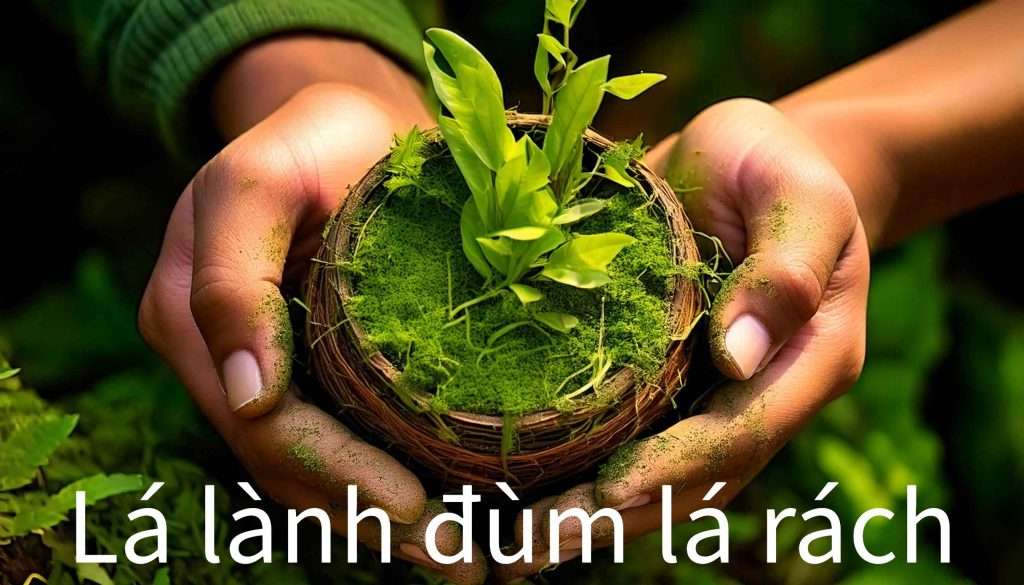
Reflecting on this experience, I’ve realized how essential it is to create a classroom environment that fosters belonging, where culture and language are not just respected but embraced. Technology, especially AI, can play a transformative role in enhancing this cultural exchange and inclusivity. For instance, using AI tools like Adobe Firefly, I visually represented the essence of “lá lành đùm lá rách” by generating an image of hands gently holding leaves. This visual aid helped bring the proverb to life, serving as a meaningful reminder of the community’s role in supporting one another. I’ve previously written about using Adobe Firefly in the classroom, exploring its potential to create engaging and culturally relevant visuals that enhance learning experiences.
Incorporating tools like text-to-image generators such as Adobe Firefly offers educators a way to create inclusive, culturally relevant visuals that reflect the diversity of their students. Imagine a classroom adorned with AI-generated posters and illustrations depicting proverbs and values from around the world, fostering an environment of mutual respect and curiosity. These materials not only engage students but also affirm their identities, creating a safe space where they feel valued and inspired to learn.
Coincidentally, before diving into this class activity, I had written a blog post on resilience and leadership inspired by Sir Ernest Shackleton’s ill-fated expedition to Antarctica. After watching a National Geographic documentary on the subject with my kids, I reflected on Shackleton’s journey, which, despite ending in failure, stands as a powerful example of leadership. His deep understanding of each team member’s needs and unwavering commitment to their well-being embody the same spirit as “lá lành đùm lá rách.” Shackleton demonstrated that true leadership isn’t defined by personal achievement but by supporting others, particularly in times of hardship.
Somehow, as an immigrant in this country, the past few months have made me even more aware of the importance of these values.The wisdom of “lá lành đùm lá rách” and the resilience demonstrated by Shackleton resonate profoundly with my personal journey and the challenges faced by many who start anew in a foreign land. Navigating a different culture, language, and set of expectations requires empathy and resilience, not only from us as individuals but from those who choose to offer their support.
Now, more than ever, I see how the values of community, empathy, and shared responsibility can build bridges across differences. These qualities enrich our personal and professional lives and are essential for creating spaces where everyone feels respected, valued, and empowered to contribute. By embracing cultural wisdom and innovative tools like AI, we can create learning environments where students not only learn from one another but also grow together as part of a vibrant, diverse community.