Visit EnablingLearning.com →

Every Enabling Learning Course Now Includes a Verified Digital Credential

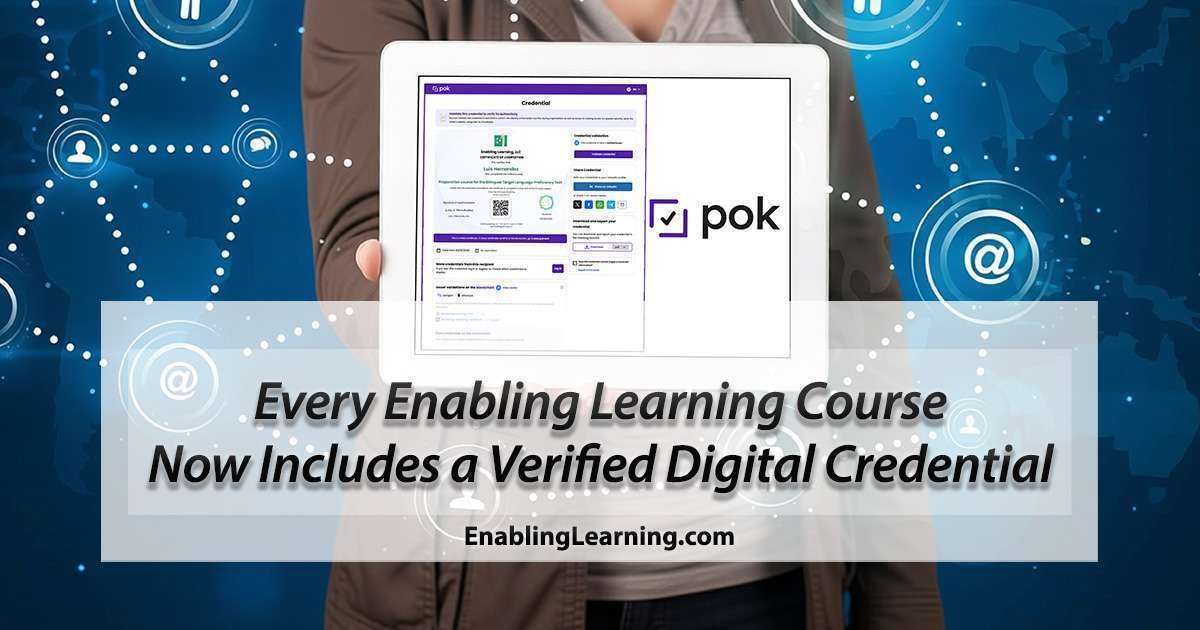
Enabling Learning digital credential displayed on a tablet, showing the POK verification page with QR code, LinkedIn sharing, and verified issuer status

AI-Generated Audio Summary

If you have ever had to prove your professional development hours to an employer, a school district, or a university, you know the problem. Paper certificates get lost. PDFs can be fabricated. And verifying that someone actually completed a course usually means phone calls, emails, and waiting.

Starting now, every student who completes an Enabling Learning course receives a verified digital credential that anyone can confirm in seconds.

What Changed

Enabling Learning is now a verified credential issuer on POK (Proof of Knowledge), the global platform for digital credentialing used by over 1,100 universities and organizations across 19 countries. POK has issued more than 1.5 million credentials worldwide.

This means your Enabling Learning credential is not just a local certificate. It follows the Open Badge 3.0 standard, the same international standard used by leading universities and employers around the world.

What You Get When You Complete a Course

  • A verified digital certificate with your name, course title, completion date, and skills developed
  • A unique QR code that links to a secure verification page
  • One-click LinkedIn sharing under “Licenses & Certifications”
  • A downloadable PDF for your records
  • A permanent credential accessible from any device, anytime

Why This Matters

Consider this: a school district receives two applications for a bilingual teaching position. Both candidates list professional development courses on their resume. One hands over a PDF certificate. The other says, “Scan this QR code.”

The QR code links to a verification page that confirms the credential is real, shows exactly what competencies were developed, and identifies Enabling Learning as a verified issuer. No phone calls. No follow-up emails. Instant confirmation.

That is the difference between a certificate and a verified credential.

How It Works

The process is simple and automatic:

  1. Complete your course: finish all modules, lessons, and required assessments
  2. Receive your credential: it is issued automatically upon course completion
  3. Share anywhere: add it to LinkedIn, send it to an employer, or download the PDF

You can view all your earned credentials on your My Digital Credentials page.

What Makes This Different from a Regular Certificate

Regular PDF CertificateVerified Digital Credential
Can be edited or fabricatedTamper-proof, issued by a verified institution
No way to confirm authenticityQR code links to a live verification page
Sits in a folder on your computerLives online, always accessible
Lists a course titleLists specific skills and competencies
Means nothing to someone who doesn’t know the issuerBacked by an international standard (Open Badge 3.0)

Get Started

Ready to earn your first verified digital credential? Browse our course catalog and enroll today.

To understand what stands behind every credential we issue, read Why We Use Digital Credentials.

If you have already completed a course and would like to receive your digital credential, contact us and we will issue it for you.


Enabling Learning, LLC is a verified credential issuer on the POK (Proof of Knowledge) platform. All credentials follow the Open Badge 3.0 international standard.
Leave a Comment

Your email address will not be published. Required fields are marked *

More Posts

A navy blueprint sheet with white line drawings of Verónica's four roles: a central ring, a lesson sheet and learner figure, a cabinet of drawers, a scoring card, and a heatmap grid with green hatched cells

Four Years of Building Verónica

Verónica, the AI tutor inside our courses and apps, has four roles: study buddy, evaluator, smart tutor, and a source of insight for the people who teach. Four years after we started building her, we spent October mapping every place she runs and rereading the research on tutoring, feedback, retrieval, and model-based scoring. This post takes each role in turn: what other researchers’ work asks of it, how we built it, and where we draw the line between what they have shown about AI tutors and what we have measured about ours, which is not yet a systematic study.

An educator and an adult learner smile as they review work together at a table, with a friendly AI tutor glowing on the laptop beside them.

How We Use AI, and Why Our Digital Credentials Require Evidence

When we talk about our work with educators, at conferences and with universities, two questions come up: how do we use AI, and what does our digital credential actually prove? We answered both in writing, in two new pages on our website. The first is a note from our founder, Luis J. Hernández, on how an educator came to build with AI and where we draw the line. The second explains why our digital credentials are issued only when a learner shows the skill, and why that matters for learners and the institutions that prepare them.

A single objectives card pinned on an elementary classroom wall, with a stack of cards for the rest of the week on the teacher's desk.

One Objective on the Wall. Five Levels in the Room.

Principals want the ELPS posted, but one classroom holds students at five proficiency levels. How do you post one objective for all of them? We answered with something teachers can print and use, the Objectives Card in the ELPS Online Helper: one content objective, one language objective, and a strip showing what meeting it looks like at each level. Here is what it does, what we added after seeing how teachers used it, including a week planner and cards for lessons taught in Spanish, and why it matters in a dual-language classroom.

Layered translucent glass panes suspended in dark blue space, each etched with glowing abstract letterforms from a different writing system, overlapping and interlocking where the panes cross.

Verónica Speaks Twelve Languages. The Hard Part Was the Rules.

Verónica, the AI tutor inside our courses and apps, now responds in twelve languages. Arabic, Telugu, Tamil, and Korean joined because districts and teacher preparation faculty kept describing the families they serve. Adding the languages was never the hard part, since these models were multilingual from the start. The hard part was the rules: which characters even count as letters, whether the page or the person gets to decide, and when a tutor should hold the target language instead of following a student into English. Here is what broke, what we changed, and why it matters.

Scroll to Top
El acento escrito

¿Cómo colocarlo?

Si no sabes cómo colocar el acento escrito, te compartimos varios enlaces que te  pueden ayudar según sea el caso de tu dispositivo.

Windows – Keyboard shortcuts for international characters

Windows – How to Type Characters with Accents on Windows

Mac OS and iOS – Enter characters with accent marks on Mac

Android – Type in a different language