AI-Generated Audio Summary
One afternoon a few years ago, I was volunteering with the Bilingual Homework Hotline, an after-school project between two North Texas universities and a local school district that connects university tutors with K-12 emergent bilingual learners over Zoom. If you want the full story of how that program began, I wrote it in The Story Behind the Bilingual Homework Hotline.
A high school student came into my session looking for help with his homework. He had recently arrived from a Spanish-speaking country. The homework, the textbook, the examples, the directions, everything in front of him was in English. He looked stressed.
I took a few minutes to read the activity, and then I walked through it with him in Spanish, in plain language, one step at a time. Within minutes, the tone of his voice changed. He started making connections on his own and asking the next question himself. The stress had been blocking him; it was not the content. At the end of the session, he thanked me many times, saying he finally had an idea of how to do his homework. That has stayed with me.
The stress itself had not been arriving out of nowhere. The English in front of him was not yet comprehensible input, the term Stephen Krashen uses in the Input Hypothesis for language pitched just above the learner’s current level so that meaning can actually come through. Without that, the work felt impossible, and the harder he tried, the higher the wall went up.
Part of why I loved the Bilingual Homework Hotline so much is that it was a place where second language acquisition theory met real students. At the time, I was teaching bilingual education and ESL methods at Texas Woman’s University, and many of the university tutors logging into those Zoom sessions were my own students. They were studying Krashen’s hypotheses with me in our seminars and then watching them play out, in real time, with K-12 learners on the same week. That is what teacher preparation is supposed to feel like.
Two hypotheses, working together
Comprehensible input and a low affective filter point in the same direction, and they have to work at the same time. Acquisition needs both at once: input the learner can actually access, and an emotional state low enough to let the input through. When stress, anxiety, or self-doubt is high, the filter rises and blocks input from being acquired even if the input would otherwise be comprehensible. The student may follow the words in the moment, but they do not stick.
Lowering the filter does not mean making content easier. It means making the learner feel safe and supported enough that comprehensible input can land. In that Zoom session, the most direct way to do both at once was to meet him in the language he already had, walk through the concept, and then walk back into the English version with him.
For moments like that one, we built Verónica. She is present across all of our courses and preparation apps for the same reason.
AI tutors as more knowledgeable others
I have written before about why I started building AI tutors as Vygotskian mentors, what Vygotsky called “more knowledgeable others.” A skilled mentor meets the learner where they are and walks them to where they can go. For most students, the bottleneck is not whether such mentors exist; it is whether one is available the moment they get stuck.
What shifted in the last few years is what the underlying technology can do across languages. As I described in Why Modern AI Was Built Multilingual From the Start, today’s frontier models share embedding space across languages and can hold a study conversation in Spanish, Vietnamese, or Mandarin Chinese with the same care they bring to English. That is what made it possible to finally build Verónica the way we always wanted to build her: a tutor who can sit next to a student, in their first language when they need it, and walk them through the work without raising their stress.
How we built her
Verónica is not a generic chatbot. She is grounded in expert-curated knowledge bases through a retrieval system, so every reply is anchored in verified material from the exam the student is preparing for, not improvised from general training data.
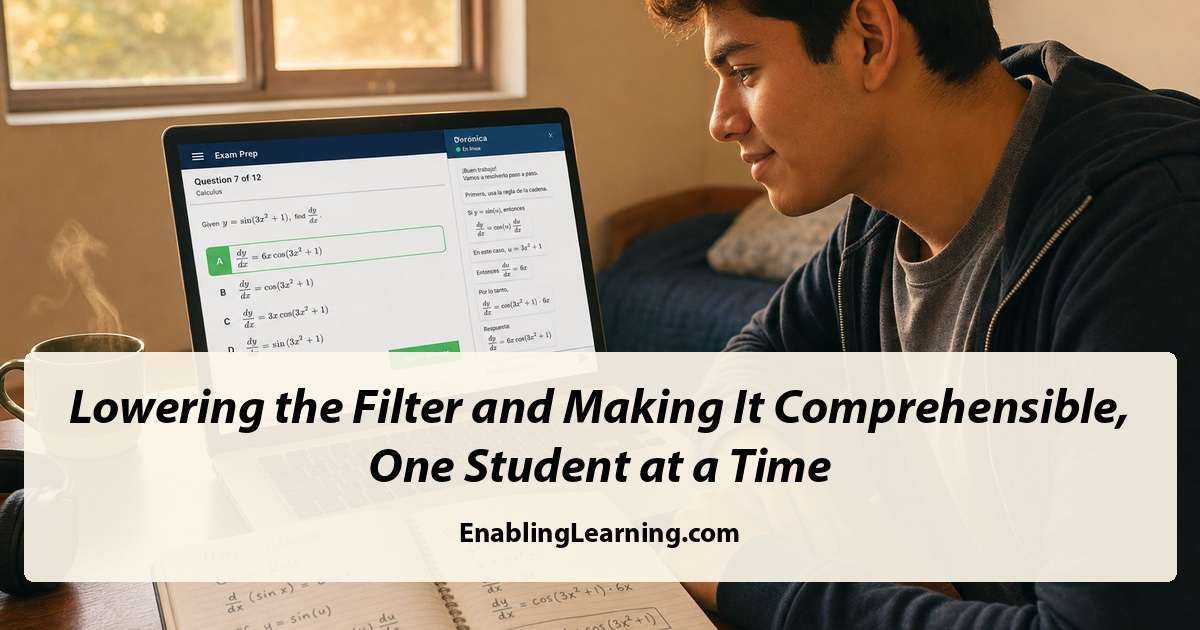
We invested specifically in the languages we see most often in North Texas classrooms: English, Spanish, Vietnamese, Tagalog, Hindi, Urdu, Mandarin Chinese, and Brazilian Portuguese. When a student asks her for help in any of these, she answers correctly, naturally, and in that same language, with both written text and natural-voice audio playback.
She is also context-aware. She can see the exact item the student is working on. She can read the problem with the student, walk through it, give feedback on a wrong answer, prompt reflection, and hold a real conversation in the student’s first language or in English. What she does not do is just as important. During active practice, she is designed to use hints and questions instead of handing over the answer. The student still does the thinking and chooses the response.
The two apps
Today we are launching two new apps, both powered by Verónica.
TSIA Prep prepares students for the Texas Success Initiative Assessment 2.0, the placement exam that determines whether a Texas high school graduate enters college-level coursework directly or moves through developmental coursework first. The track covers mathematics and English Language Arts and Reading, including the TSIA2 essay, with 5,000+ pre-verified practice items designed around Texas college-readiness skills. The bank uses independent model checks and ongoing content review.
Our High School Equivalency Exam Prep (GED® Test) prepares adult learners for the high school equivalency credential that opens postsecondary and workforce pathways for adults who did not finish high school. The pool includes 2,300+ verified, bias-balanced items across the four subjects, with Verónica grounded in exam-aligned content for the structure and the 100 to 200 score scale.
Why we built these specific apps
We did not build these two apps as a generic offering. We built them because of what we keep seeing on the ground in Texas.
Across many school districts, emergent bilingual high school seniors are taking the placement exam and being routed into developmental coursework, not because they cannot do college-level work but because the test is delivered under conditions that do not let them show what they actually know: in a single language, with no bilingual support, and with the affective filter that those conditions predictably raise. Across the same region, adults are working full-time jobs and trying to finish what they started, looking for a way to earn the high school equivalency credential on a schedule and a budget that fits the life they are already living. These are the learners we have been building for.
Closing
If you lead a teacher preparation program, a developmental education initiative, an adult education program, or a charter network with a college-readiness pipeline, we would welcome the chance to walk you through what these apps do with real students, in real languages, on real problems. Contact us and we will set you up with a demo or evaluator account.
Enabling Learning LLC builds AI-supported preparation systems for bilingual education, ESL, college readiness, and adult learning. Our products are designed by educators, grounded in expert-verified content, and reviewed at every stage.
GED® is a registered trademark of the American Council on Education (ACE) and administered exclusively by GED Testing Service LLC under license. This Enabling Learning study tool is not affiliated with, endorsed by, sponsored by, or approved by ACE or GED Testing Service.